The Stack · WordPress

WordPress: the plugin set that matters,
and how the pieces fit together.

WordPress is the part of the stack you own outright: your pages, your forms, your data, on a server nobody can switch off. The mistake most sites make is not the platform, it is forty plugins doing eight jobs. Here is the eight-plugin baseline we run, what each one is for, and the discipline that keeps it fast and safe.

Why WordPress

The Owned Hub

Every ad click has to land somewhere, and where it lands decides whether the click becomes a lead. On a rented funnel page you do not control speed, tracking, or what happens to the submission. On WordPress you control all three: the page is yours, the form posts directly to your Salesforce, and the tracking tag is first-party.

It is also where the MariaCare plugin runs: security hardening and scanning, performance checks and a server monitor, under your login. If we part ways, the site, the plugin and the data stay with you.

The baseline

Eight Plugins, Each With One Job

Purpose first, then how each one interacts with the others. Names are the current defaults; the jobs do not change.

SEO

Yoast SEO

or Rank Math. One, never both.

Purpose: Titles, meta descriptions, the XML sitemap Google crawls, and Organization / FAQ / Article schema. It is where the page a Google ad lands on gets the title and description Google scores for relevance.

Fits with: Sitemap submitted to Search Console; Site Kit reads its settings; the MariaCare plugin checks every landing page has a unique title and one H1.

Caching & performance

WP Rocket / LiteSpeed Cache

depends on the host. Plus Cloudflare in front.

Purpose: Stores the finished HTML of each page so a visitor is served a file, not a database query. Also minifies CSS/JS and delays scripts that are not needed for the first paint.

Fits with: Purges itself when content changes; Cloudflare caches what it outputs; the MariaCare plugin measures the origin response time behind both.

Security

Wordfence

or an equivalent WAF + login hardening. Plus Cloudflare WAF rules.

Purpose: A firewall inside WordPress that blocks known exploit patterns, limits login attempts, scans files for malware, and enforces two-factor authentication on admin accounts.

Fits with: Cloudflare drops the bulk of attack traffic at the edge; Wordfence catches what is aimed at WordPress itself; the MariaCare plugin runs its own integrity and process checks and reports findings to our monitoring center.

Backups

UpdraftPlus

or host-level snapshots. Always off-site.

Purpose: Scheduled copies of the database and files to storage that is not on the same server: S3, Google Drive, or the host's snapshot system.

Fits with: Runs before every update window; restore tested, not assumed. A site that cannot be restored in an hour is one bad update from losing a week of leads.

Forms

WPForms / Gravity Forms

posting to Salesforce Web-to-Lead.

Purpose: The lead form itself: validation, spam screening, the thank-you page that fires the conversion event, and the hidden fields that carry UTM and GCLID values into the submission.

Fits with: Every submission becomes a Salesforce Lead with its attribution; the thank-you page is where the Google Ads conversion fires, so a form fill counts once and a page view counts never.

Google integration

Site Kit by Google

Purpose: Google's own plugin. Verifies Search Console, installs the GA4 tag, links the Google Ads account, and shows the three reports inside wp-admin.

Fits with: One first-party tag for everything Google; Google Ads reads the conversions it fires.

Image optimization

ShortPixel / Imagify

or server-side WebP conversion.

Purpose: Converts uploads to WebP, resizes oversized originals, and serves the right size per device. Images are the usual reason a landing page is slow on a phone.

Fits with: Works with the cache and Cloudflare so the small version is what gets cached; Core Web Vitals in Search Console is where we see it pay off.

Security & monitoring

MariaCare Security & Performance (ours)

sits alongside the above and watches all of it.

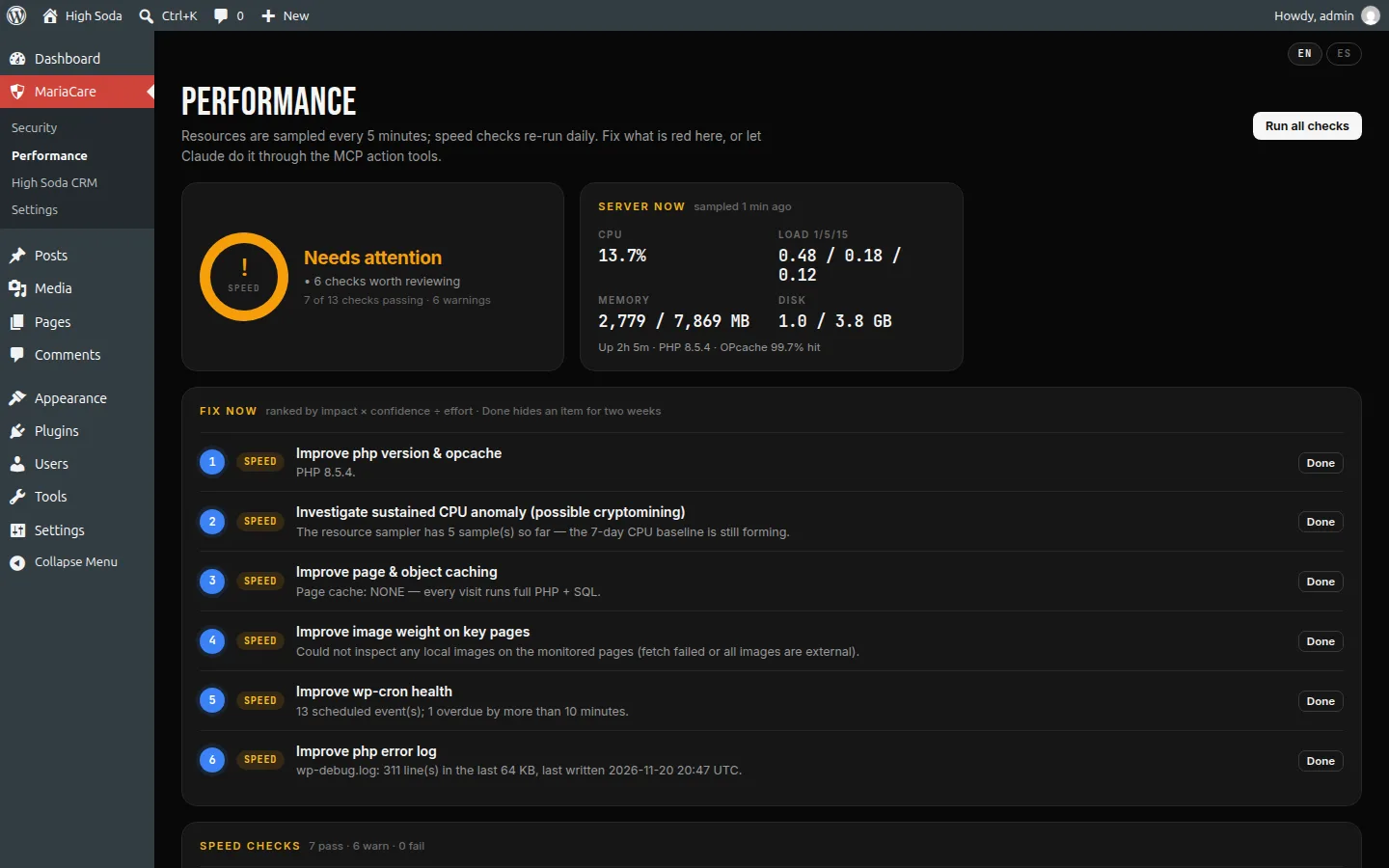
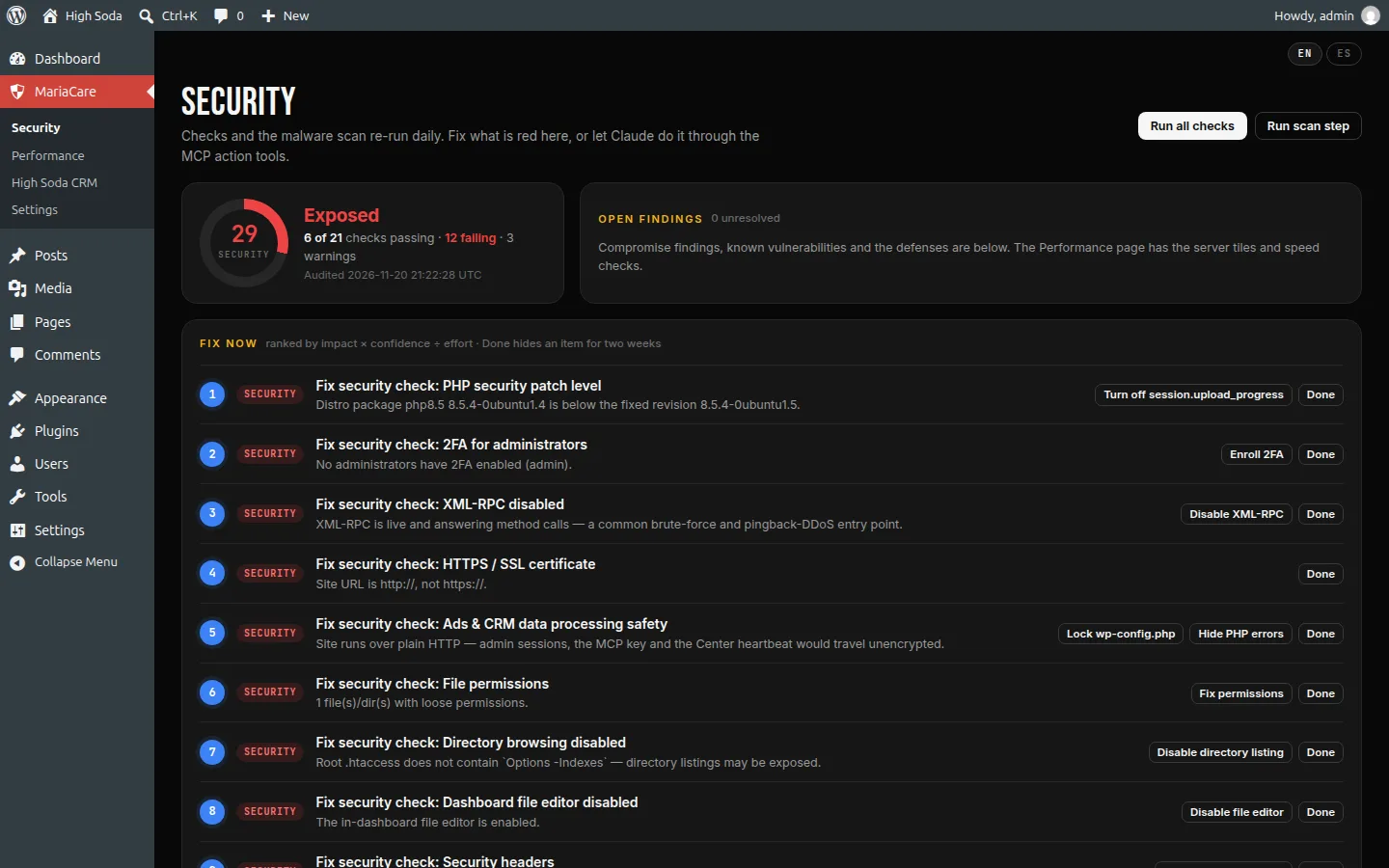
Purpose: Hardens the site, scans it daily for malware, integrity changes and known vulnerabilities, runs the performance checks and the server monitor, and reports to MariaCare every fifteen minutes.

Fits with: It is the layer that tells us a landing page is slow or compromised before the ad budget finds out.

How it fits together

One Visit, End to End

Cloudflare

DNS, TLS, edge cache, bot filtering. Static files never reach the server.

Page cache

Serves the stored HTML; WordPress runs only when a page changes.

Landing page

Yoast title + schema; WebP images; Site Kit tag records the visit in GA4.

Form

Hidden UTM/GCLID fields; spam screened; posts to Web-to-Lead.

Thank-you page

GA4 key event + Google Ads conversion fire here, once, on a real submission.

Salesforce

A Lead with its attribution, worked through the stages to Customer.

🏈
This exact chain runs in public: every team page on maria.care/sports is a WordPress landing page with this form, and the pipeline page shows the submissions arriving. How the demo works →
The MariaCare plugin: Security
The MariaCare plugin: SecurityDaily scanning, hardening and the fix list, on the same WordPress install the forms run on.
The MariaCare plugin: Site Performance
The MariaCare plugin: Site PerformanceThe working checks and the server monitor that keep the landing page fast enough to convert.

Discipline

The Rules That Keep It Fast and Safe

RuleWhat we doWhat it prevents
Low plugin countThe eight above, plus at most two or three site-specific ones. Anything unused is deleted, not deactivated.Conflicts, slow admin, and the abandoned plugin that becomes next year's security hole.
Update cadenceSecurity releases within 48 hours. Everything else weekly, in one window, after a backup.Running a known-vulnerable version for months, or updating twelve things at once and not knowing which one broke the form.
Staging firstCore and plugin updates applied on a staging copy, form submission tested, then promoted.Finding out from a lost lead that the update broke Web-to-Lead.
Child themeEvery template or style change lives in a child theme; the parent is never edited.A theme update erasing the landing-page changes that were converting.
Least privilegeTwo-factor on every admin; editors get Editor, not Administrator; file editing disabled in wp-config.One phished password becoming a full site compromise.

How MariaCare handles WordPress for you

Hosting, the plugin set, the landing pages, the forms, and the weekly maintenance window are all part of a pay-per-customer engagement. You do not manage any of it, and you own all of it.

  • Site built or migrated onto this baseline, with a child theme from day one
  • Hosting, TLS and Cloudflare configured and monitored
  • Forms wired to Salesforce Web-to-Lead with attribution fields
  • Updates on cadence, staging first, backups before every window
  • Security hardening and integrity scans from the MariaCare plugin
  • Landing pages rewritten when GA4 says they are losing the visitors you paid for
Get Started →

Questions

WordPress FAQ

Why not Yoast and Rank Math both?

They do the same job: titles, meta descriptions, XML sitemap, schema. Two of them means two sitemaps, two sets of meta tags and conflicting schema, which Google treats as noise. Pick one. We default to Yoast because Site Kit and the MariaCare plugin read its sitemap and meta.

Do I need a caching plugin if I have Cloudflare?

Yes. Cloudflare caches static files at the edge; the page cache stores the HTML WordPress builds so PHP and the database are not hit on every visit. Together the first byte arrives in tens of milliseconds. Either one alone leaves a slow step in the chain.

How many plugins is too many?

There is no magic number, but every plugin is code someone else maintains, a possible conflict, and an attack surface. The baseline set here is eight. If a feature can be done in the theme or in Salesforce instead of with another plugin, do it there.

What is a child theme and why does it matter?

A child theme holds your customizations separately from the theme you bought or installed, so the parent can be updated without wiping your changes. Editing the parent directly means the next update either breaks your site or you stop updating, and both end badly.

Pay Per Customer

Pay When a Customer Is Validated.
Not Before.

5% of customer value per validated customer when you pay ad spend, 10% when MariaCare pays it. No setup fee, no minimum, no term. A customer who churns within 30 days is never billed.

THE FEE
5% or 10% of Customer Value

Per validated customer. One customer value per account, agreed at signing. Fixed monthly for annual contracts through Talk to Sales.

THE PROOF
Your CRM Decides

A customer counts when your CRM marks Lifecycle Stage = Customer. The count comes from your CRM; every invoice line names the record. Salesforce, HubSpot or Microsoft Dynamics; if you have none, MariaCare sets one up for you.

Get Started → Talk to Sales