


The Stack · Your CRM

Your CRM: the one place
where a lead becomes a customer.

Pay per customer needs one record that says, without argument, which leads became customers and when. That record is your CRM. It can be Salesforce, HubSpot or Microsoft Dynamics, another system with a usable API, or one MariaCare sets up for you before launch if you have none. The ads and the website change by channel; this part never does.

The one requirement

A Stage Field Your Team Writes and MariaCare Reads

Every lead from your site arrives in the CRM with its attribution: the campaign, the channel and the click ID that produced it. Your team works it the way it works any lead. When it becomes a customer by your own definition, someone on your side sets the stage field to Customer. That field is the whole contract: MariaCare counts it, invoices one line per record, and never writes it.

So the only thing a CRM must have is a field equivalent to Lifecycle Stage = Customer that your team can write and MariaCare can read through a report, an export or the API. Salesforce has it out of the box; HubSpot and Dynamics have their own; most others can add one. A customer who churns within 30 days is never billed, and a record is billed once, ever.

Supported

Salesforce, HubSpot, Microsoft Dynamics, or None

Salesforce is a credential, not a requirement. We know it best and run it ourselves, which is why it has its own explainer; the pipeline connects to the others the same way.

CRMs we work in

Salesforce is a trademark of Salesforce, Inc. HubSpot is a trademark of HubSpot, Inc. Microsoft Dynamics 365 is a trademark of Microsoft Corporation. MariaCare works in these CRMs and is not certified by, sponsored by, or affiliated with any of them.

Our recommendation

Salesforce

Web-to-Lead from your site, the Lifecycle Stage field, Flows for follow-up and the Customer report MariaCare invoices from: the setup we run for every client who chooses it, and on our own org.

  • Attribution on custom Lead fields, so cost per customer by campaign is a report
  • Starter or Pro Suite is enough for most local businesses
Read the full explainer →

Supported the same way

HubSpot · Microsoft Dynamics

If you already run HubSpot or Dynamics, the form posts to it, a lifecycle or stage property plays the Customer role, and MariaCare reads it through a report or the API. Zoho, Pipedrive, GoHighLevel, ServiceTitan, Jobber and other CRMs with a usable API connect the same way.

  • No migration: your records stay where they are
  • The stage field is agreed in writing before launch

No CRM yet

MariaCare sets one up

For a client with no CRM, MariaCare sets the record up before launch, in your name: Salesforce Starter is enough for most local businesses, with the stage field and the Customer report configured. You own it from day one.

  • You see and confirm the customer list before any invoice is issued
  • Seats billed through at cost; the data is yours and exported in full on request

A Lead Inside the Client's CRM

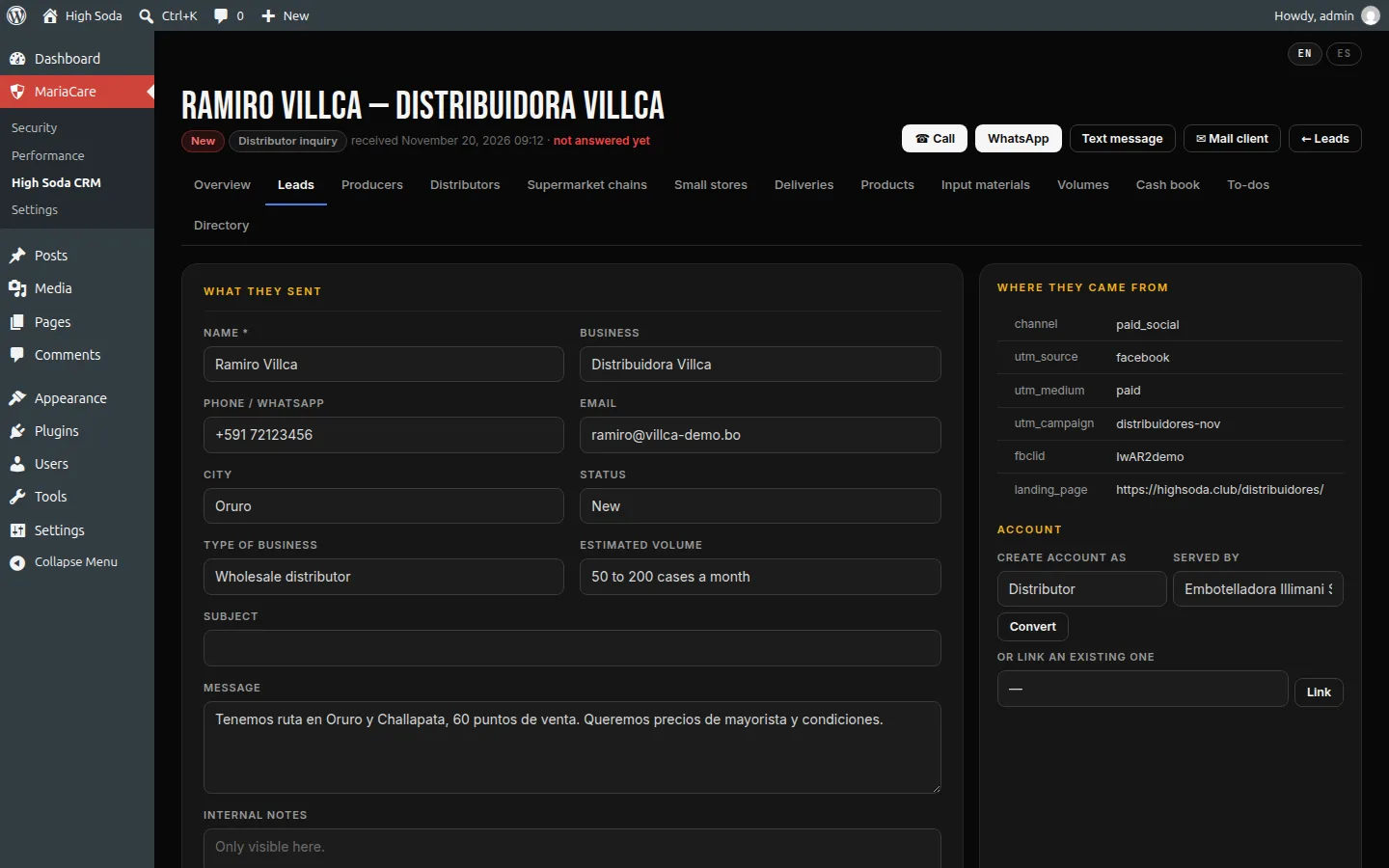
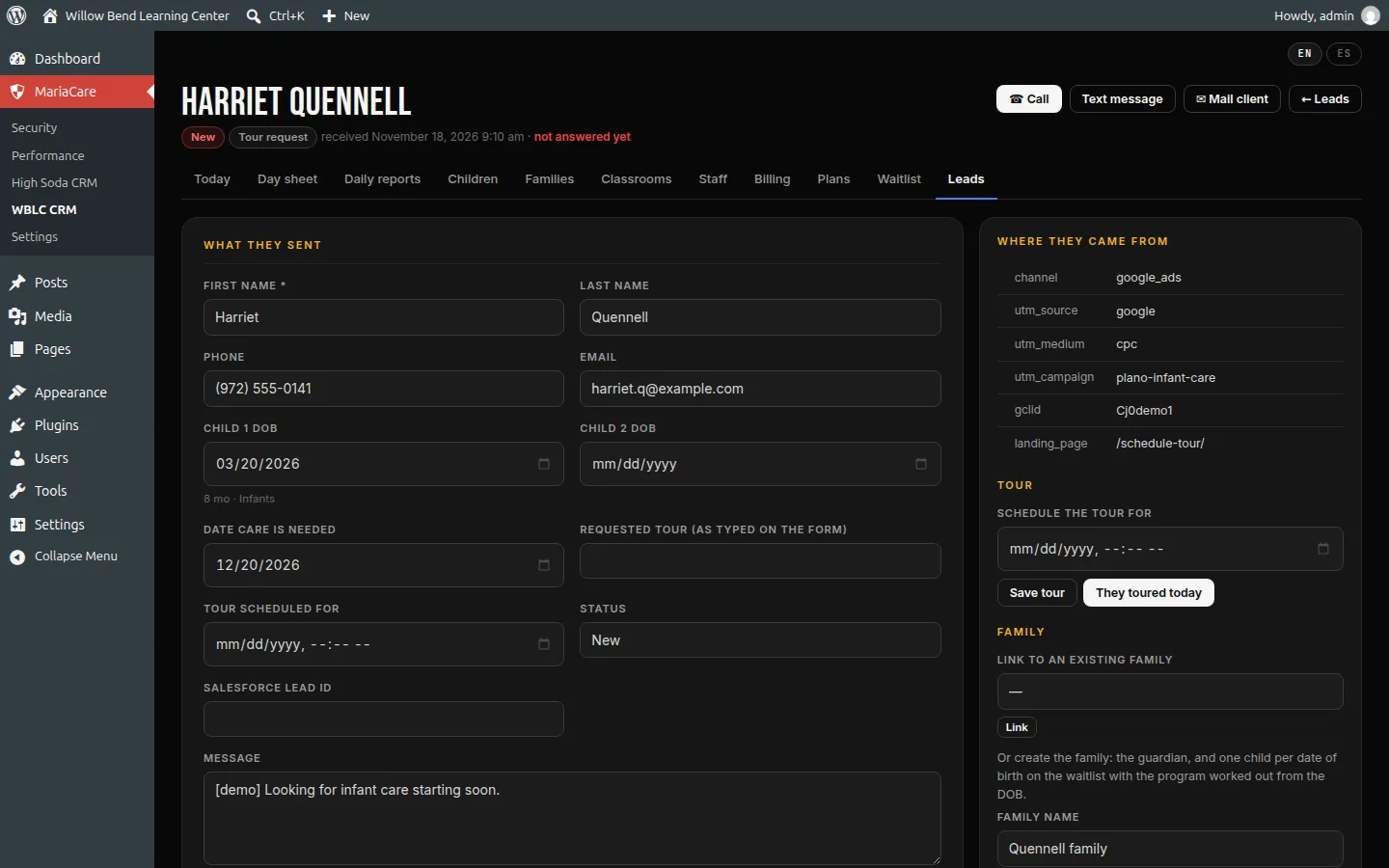
Two clients, two CRMs, the same record: the source and click ID the form attached, and the stage field the client's team writes.

A lead in the WBLC CRM
A lead in the WBLC CRMA tour request from a Google Ads click: campaign, keyword and GCLID on the record, and the stage the school's team moves to Enrolled.
A lead in the High Soda CRM
A lead in the High Soda CRMA distributor inquiry with its channel and click ID, worked in Spanish through the localized stages to a signed agreement.

How the invoice reads your CRM

MariaCare counts the records whose stage reads Customer, that have not been invoiced before, and that are past the 30-day window. The count comes from your CRM, which you can open at any time; every draft invoice lists each customer by record and date and goes to you for confirmation before it is issued, and a disputed line is excluded with a recorded reason.

  • One invoice line per validated customer, naming the record
  • Read from a report or export you can open yourself
  • Your team writes the stage; MariaCare never does
  • Finalized invoices are never edited; corrections are credit notes
Pricing →

Questions

CRM FAQ

Do I have to use Salesforce?

No. Salesforce is the CRM we know best and run ourselves, so it is our recommendation and the one with its own explainer. HubSpot and Microsoft Dynamics are supported the same way, and any CRM with a usable API can be connected. A client with no CRM gets one set up by MariaCare before launch, in the client's name. The one requirement is a field equivalent to Lifecycle Stage = Customer that your team can write and MariaCare can read.

What does MariaCare need from my CRM?

Three things: a lead record created by the form on your site with its attribution, a stage field your team moves to Customer, and a way for MariaCare to read the Customer stage: a report, an export or an API. Nothing else is required, and MariaCare never writes the stage.

What if we have no CRM at all?

MariaCare sets one up for you before launch, in your name: Salesforce Starter is enough for most local businesses, with the stage field and the Customer report configured. You own it from day one, seats are billed through at cost, and the invoice is counted from its report like any other client's.

Who confirms the count?

You do. Every draft invoice lists each customer by record and date before anything is final, and the list is read from your CRM, which you can open at any time. When the record lives in a system MariaCare operates, the same list goes to you for confirmation before the invoice is issued.

Pay Per Customer

Pay When a Customer Is Validated.
Not Before.

5% of customer value per validated customer when you pay ad spend, 10% when MariaCare pays it. No setup fee, no minimum, no term. A customer who churns within 30 days is never billed.

THE FEE
5% or 10% of Customer Value

Per validated customer. One customer value per account, agreed at signing. Fixed monthly for annual contracts through Talk to Sales.

THE PROOF
Your CRM Decides

A customer counts when your CRM marks Lifecycle Stage = Customer. The count comes from your CRM; every invoice line names the record. Salesforce, HubSpot or Microsoft Dynamics; if you have none, MariaCare sets one up for you.

Get Started → Talk to Sales